The tradesman appwith your whole office team inside
Take a photo, say it, or send a message. Your office does the rest. It already knows your business: your rates, Tax, bank details, suppliers, logo and how you like things done. It learns from everything you tell it.
Take a photo
- Photo of the job : quote
- Snap a receipt : filed
Say it
- “Job’s done at Mrs Patel’s, invoice her” : invoice
- “Plan tomorrow’s bathroom strip-out” : job plan
Send a message
- “Quote Mr Hughes for a new breaker panel” : quote
- Forward a supplier’s bill : filed
No forms. No typing in line items.
380+ contractors, free to start
Job plan · from 3 photos
- Remove existing window & frame
- Install support beam (LVL) for wider opening
- Cut & form new opening to 2.4m
- Fit bifold door frame & panels
- Make good internally & externally
Est. 3–4 days · Structural work required
Customer wants to replace a kitchen window with bifold doors. Can you help me quote it?


I can help with that. Could you upload a few photos? I'll need the current window (inside and out) and the wall area so I can assess the opening size and any structural work needed.
Here you go — 3 photos of the window:
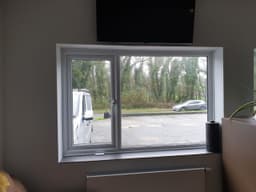

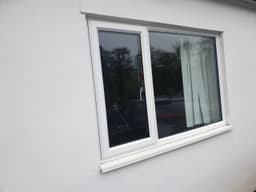
I can see the existing opening is roughly 1.8m wide. You'll need to widen it to around 2.4m for standard bifolds. Here's the plan:
- 1. Remove existing window & frame
- 2. Install support beam (LVL) for wider opening
- 3. Cut & form new opening to 2.4m
- 4. Fit bifold door frame & panels
- 5. Make good internally & externally
Est. 3–4 days · Structural work required
Perfect. Quote it up for me.
Quote ready. I've factored in the structural steel, building code notification, and current material prices.
#Q-01204
Bifold doors · Window conversion
$6,200.00
Labor $2,100 · Materials $3,170 · Tax $930
Compliance check
- building code Part A (structure)Needed
- Part L (glazing U-values)Needed
- Planning permissionNot required
The app says when it isn't sure. Check with your local authority.
A real conversation in the app. No site visit, no evening at the laptop.
You send it. Your office writes it.
A photo, a voice note or one line of text goes in. The finished quote or invoice comes out, filled in from what your office already knows about your business.
You send · A photo
One photo of the window. “Bifolds here, please.”
You get · A quote
Bifold doors · Window conversion
$6,200.00
Labor $2,100 · Materials $3,170 · Tax $930
You send · A 10-second voice note
“Leak under the sink's sorted at Mr Okafor's. Four fifty all in, parts and labour. Invoice him.”
You get · An invoice
- Leak repair under the kitchen sink, parts and labour
- £450.00
- Amount due
- £450.00
Your logo, bank details and payment terms added
You send · One line of text
“Quote Mr Hughes for a new breaker paneland two extra sockets in the kitchen.”
You get · A quote
- Labour · 1 day
- £340.00
- Materials · 7 items priced
- £412.00
- Tax
- £150.40
- Total
- £902.40
Flagged: NEC notification
What you’ll never do:
- Type in line items
- Work out the Tax
- Start from a blank invoice
Quotes, invoices and your books. One app.
The paperwork a small trade business can't afford to hire for, done from your phone while you're on the tools.
- 1
Send it however suits you
A photo, a voice message or a line of text. On site, in the van or on the sofa.
- 2
Check what your office wrote
Your rates, Tax, bank details and logo are already in. Ask for any change in your own words.
- 3
Send it to your customer
A branded PDF, straight from the app. Nothing goes out until you say so.
01 · Quotes
Branded quotes in minutes
Say it, type it or send a photo of the job. The app writes the quote with current material prices and your logo, ready to send to your customer.
See AI quoting→You said: “Replace the kitchen window with bifold doors, three panels, making good inside and out.”
- Labour · 4 days
- £1,280.00
- Materials · 9 items priced
- £2,946.00
- Total
- £4,226.00
02 · Quotes from a photo
A quote from a photo of the job
Take a photo of the job. The app reads what's in it, asks about anything it can't see, and writes the quote from there.
See photo analysis→The app saw: a uPVC window about 1.8m wide in a cavity wall, a radiator underneath, level access outside.
It asked: is the lintel staying, and who is making good the plaster?
03 · Invoices
Branded invoices in minutes
Say it, type it or send a photo when the job's done. The invoice is written with your logo and bank details, and sent to your customer as a PDF.
See invoices→Your message
“Job's done at Mrs Patel's, invoice her for the bifolds less the £1,000 deposit.”
- Bifold doors, supplied and fitted
- £4,226.00
- Deposit paid
- −£1,000.00
- Amount due
- £3,226.00
Pay by bank transfer · your sort code and account number
04 · Remote quotes by link
Quote the job without driving to it
Send a link. Your customer adds photos, the app asks the questions you would, and the quote is ready before you've finished your tea.
See remote quoting→Your customer opens sleeplesstradesman.com/q/your-name, describes the job and adds photos. The app interviews them and writes the brief.
05 · Job planning from a photo
A job plan from one photo
Send a photo, or say what the job is, and the app plans it: the steps in order, the materials for each stage, and the regulations to check before you start.
See job planning→- Day 1 · Prop, cut out and fit the new lintel6 items
- Day 2 · Form the opening, fit the frame4 items
- Day 3 · Hang the doors, seal and adjust3 items
- Day 4 · Make good inside and out5 items
06 · Receipts and bills
Receipts filed from a photo
Snap a receipt and the app reads the supplier, date and total and files it under the right tax category. Forward a supplier's bill by email and it's filed too.
See accounting→- Supplier
- Builders' merchant
- Date
- 12 Nov 2026
- Total, including VAT
- £148.60
- Filed under
- Materials
Also in the app: customer messages answered, material prices checked, regulations flagged per job.
- 380+
- contractors set up on the app
- 610+
- quotes written by the app
- 940+
- jobs talked through, day and night
Simple pricing. Accounting included.
Start free. Every paid plan includes the accountant. Same price on the web and in the App Store. Cancel any time.
Free: your first invoice at no cost, no card requiredStarter
Talk to your office: 100 messages a month
- AI quotes and job plans
- Photo analysis
- Quotes and invoices with your bank details
- Accounting: receipts, expenses, job profit, quarterly figures
- PDF export
- 100 AI messages a month
Premium
Talk to your office: 500 messages a month
- Everything in Starter
- 500 AI messages a month
- Unlimited conversations
- Material price lookup online, with database fallback
- Priority support
Enterprise
From £100 a month for 4 seats
Talk to your office: 500 messages a month for each person
- Everything in Premium
- 1 manager and 3 staff included
- Extra seats £25 a seat up to 10, then £20
- Team job management and reassignment
- Team chat and direct messaging
- 500 AI messages per user a month
Common questions about Sleepless Tradesman
What is Sleepless Tradesman?
Sleepless Tradesman is your whole office team in one app for trade businesses. It does the seven office jobs a bigger firm pays people for: admin and customer messages, remote quotes, an accountant, an insights analyst, a cheapest-price finder, a legislation and compliance advisor and a marketer. You describe a job or send a photo, the app writes the quote, and you tell it what to change. It replaces the Word templates, spreadsheets and paper invoices most tradespeople use today.
Is it free to use?
Yes. You can sign up free and make your first invoice at no cost. Your Making Tax Digital records (expenses, cash and CIS income, mileage and quarterly figures) are free too. Paid plans start at £29.99 a month and add AI receipt scanning and job profit. The free tools (day rate, tax and cost calculators) need no account at all.
How does the AI quoting feature work?
Type a job description or upload a photo of the work area. The AI breaks the job into labour hours, materials, and a total price based on current UK trade rates for your specific trade. You review and adjust the figures, then send a branded PDF quote directly to your customer from the app. You check the figures before anything is sent; prices the app looks up are labelled estimates.
Which trades does it support?
Sleepless Tradesman works for every trade, including electricians, plumbers, builders, gas engineers, roofers, carpenters, painters and decorators, tilers, plasterers, landscapers, HVAC engineers, and more. The AI is trained on UK-specific trade rates, regulations, and certifications for each trade, so the quotes and compliance checks are relevant to your work.
Does it work on iPhone and Android?
Yes. There is an iPhone app on the App Store, the web app works on any phone, and the Android app is on Google Play.
How is this different from Checkatrade or Bark?
Checkatrade and Bark are lead generation platforms: you pay to be found. Sleepless Tradesman is the app that runs your office once you have the work: quotes, invoices, job management and your books. Many tradespeople use both, and your free listing on Sleepless Tradesman sends you homeowner requests at no charge.
Does it do Making Tax Digital?
The app prepares your quarterly figures in the format HMRC's Making Tax Digital quarterly updates use, ready to export for you or your accountant to submit. Filing from the app is built and tested in HMRC's sandbox but is not yet available: HMRC closed production access for new 2026-27 products on 15 September 2026.
Who is behind Sleepless Tradesman?
Sleepless Tradesman is made by Sleepless Tradesman Ltd, a UK company (no. 17538029), with advisers who work in the trades. We never sell your data.
Does the AI ever make prices or rules up?
It is not allowed to. When the app is not sure of a price or a regulation it says so, and every looked-up price is labelled an estimate until you confirm it. You approve every quote before it goes out.
Do you have an affiliate program?
Yes. Creators, accountants, merchants and anyone tradespeople listen to earn 30% of each referred customer's payments for 12 months, then 20% for life (30% on everything at Gold). Free to join. See the affiliate program
Win more work. Get your evenings back.
Free to start. Your first invoice is on us.
Free, no account needed: hourly rate calculator, plastering cost calculator, profit margin calculator, plasterer day rates, carpenter day rates, invoice templates, best apps for tradespeople, the app for HVAC engineers, a job estimate for homeowners, the Android app on Google Play and list your trade business free.